If you are new to the R programming language (a beginner), then the best tutorial that we recommend is https://www.tutorialspoint.com/r/index.htm. It is free and very interactive. There are LIVE DEMOs for most examples and you can practice them using your web browser.

Monday, February 3, 2020

Saturday, February 1, 2020
VirtualBox Error in supR3HardenedWinReSpawn VBoxHardening
Problem
One of our students was getting the error VirtualBox Error in supR3HardenedWinReSpawn with log details in VBoxHardening.log while starting a virtual machine.
This issue happens even after uninstalling VirtualBox and reinstalling using a different version. It happens both with version 6.x and 5.x respectively.
Solution
This problem was resolved after uninstalling "Trusteer Endpoint Protection" offered by IBM in the student's Windows 10 operating system.
We tried other potential solutions described in https://superuser.com/

Saturday, January 25, 2020
AWS certification training
Hello all,
DBA University has started Amazon Web Services (AWS) Training courses in 2020. We now have two courses that will help students gain rich practical skills and pass AWS certification exams.
Both the courses are live training courses and can be registered using the below links
1) AWS certified cloud practitioner
https://dbauniversity.com/course/aws-certified-cloud-practitioner
Duration: 24 hours in 4 weeks.
Schedule: Wednesday, Thursday and Friday 7:30 pm to 9:30 pm central time.
2) AWS certified solutions architect associate
https://dbauniversity.com/course/aws-certified-solutions-architect-associate
Duration: 40 hours in 5 weeks.
Schedule:
Sunday : 8:00 am to 12:30 pm central time (30 minute break).
Monday : 7:30 pm to 9:30 pm central time.
Tuesday : 7:30 pm to 9:30 pm central time.
DBA University has started Amazon Web Services (AWS) Training courses in 2020. We now have two courses that will help students gain rich practical skills and pass AWS certification exams.
Both the courses are live training courses and can be registered using the below links
1) AWS certified cloud practitioner
https://dbauniversity.com/course/aws-certified-cloud-practitioner
Duration: 24 hours in 4 weeks.
Schedule: Wednesday, Thursday and Friday 7:30 pm to 9:30 pm central time.
2) AWS certified solutions architect associate
https://dbauniversity.com/course/aws-certified-solutions-architect-associate
Duration: 40 hours in 5 weeks.
Schedule:
Sunday : 8:00 am to 12:30 pm central time (30 minute break).
Monday : 7:30 pm to 9:30 pm central time.
Tuesday : 7:30 pm to 9:30 pm central time.
Sunday, November 10, 2019
How to setup Oracle Data Guard in AWS
This article helps you set up Oracle Data Guard 12c R1 (12.1.0.2) in Amazon Web Services (AWS) with 2 node configuration (primary and standby) along with Oracle Automatic Storage Management (ASM). This article assumes that you have basic knowledge how to work with the Amazon cloud https://aws.amazon.com
1) Setup an account in https://aws.amazon.com (if you don't have one already.)
2) This 2 node Oracle Data Guard
configuration can cost about $50 per month (depending on the amount of ASM disk storage
you need) if you keep both the servers up and running
24*7.
3) Download the Oracle 12c R1
software from https://edelivery.oracle.com
for free. Also, download the Oracle 12c R1 ASM Grid Infrastructure software and
then upload them to the Amazon S3 bucket as shown below. Let the S3 bucket be named oracle12cr1.
Also download the Oracle ASM RPMs
(two of them) as shown below from the oracle website and upload to the same S3 bucket.
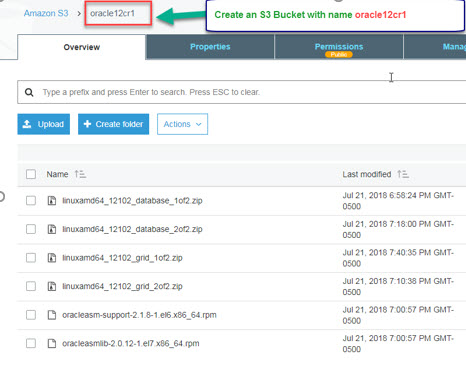
Now, launch the AWS Quick Start wizard using the cloud formation template (details in the above link). Also, you need to specify the right parameter values to setup the 2 node Oracle Data Guard configuration.
One of the below parameters (InstallBucketName)
needs to specify the above Amazon S3 bucket name that has all the Oracle
software available already.
Please use the parameters in the below screenshots that will help you in a successful launch of the 2 node Oracle Data Guard configuration in AWS.


Saturday, November 2, 2019
Oracle 19c database upgrade
Oracle Corporation released database version 19c in 2019. 19c is considered a long term release from Oracle Corporation and its extended support date is till March 2026.
Oracle Corporation does not recommend you to upgrade to 18c if you are already on one of the Oracle 12c database releases. So, if you are on either Oracle 12c R1 or Oracle 12c R2, then the recommended upgrade is to upgrade to Oracle 19c directly.
Also, another point to note is that 19c is practically considered a patch set on top of the existing Oracle 12c database versions. Oracle 19c is essentially 12.2.0.3 (12c R2 patchset 2). DBA University's Oracle DBA Training is based on 12c R2. So, essentially we cover both 18c and 19c topics in our training
Oracle Corporation is now naming their database release numbers based on the calendar year similar to Microsoft SQL Server.
To give a background, Oracle 12c R1 was released in 2013, Oracle 12c R2 base release 12.2.0.1 in 2017, Oracle 18c which 12.2.0.2 in 2018 and Oracle 19c which is 12.2.0.3 in 2019.
Sunday, June 30, 2019
oraenv unary operator expected
If you are getting the error unary operator expected while setting the environment of an Oracle instance using the oraenv command, then one reason could be that the path of the ORACLE HOME inside the /etc/oratab file must have been a symbolic link. oraenv works with only real paths, not symbolic links. You can still have symbolic links to ORACLE HOME, but the /etc/oratab must only have the real path.
Saturday, August 18, 2018
How to remove Data Guard Broker configuration in Oracle 12c R1
Introduction
Though all of the Data Guard management and administration operations can be performed using SQL*Plus, it is recommended to use the separate Data Guard Broker interface (dgmgrl). There may be special circumstances in your organization to just use SQL*Plus alone and not use the dgmgrl utility anymore.
This blog post provides the list of steps to be performed to disable and remove the Broker configuration and only have SQL*Plus to administer the Data Guard configuration.
Solution
The dgmgrl utility can be invoked from any database host in the Data Guard configuration to disable and remove the Broker configuration. This post assumes a 2 node configuration with one primary database host and another standby database host.
1) Set the standby instance environment.
2) dgmgrl
3) connect /
4) show configuration;
5) disable configuration;
6) remove configuration;
7) Now set the +ASM instance environment on both standby and primary database host (assuming the Oracle databases are using ASM) and perform the below steps.
a) cd $ORACLE_HOME/network/admin
b) Make a backup of the existing Oracle Grid Infrastructure's listener.ora
c) Now edit listener.ora and remove the entry having DGMGRL.
d) Restart the listener service.
8) Now set the Oracle database instance environment and execute the below command on both the hosts.
a) sqlplus / as sysdba
b) alter system set dg_broker_start = FALSE scope=both;
9) On the primary database, the log_archive_dest_state_2 parameter value that describes the log shipping status to the standby host may have a value of RESET (Assuming this is the parameter used for log shipping status description to standby among several other log_archive_dest_state_n parameters). Make it enable again by executing the command alter system set log_archive_dest_state_2 = enable scope=both;
10) Now login to the standby database server and set the standby database instance and execute the below commands.
a) sqlplus / as sysdba
b) shutdown immediate;
c) startup mount;
d) ALTER DATABASE RECOVER MANAGED STANDBY DATABASE DISCONNECT FROM SESSION;
e) exit
f) ps -ef | grep -i "mrp" (Must show the mrp managed recovery process on the standby server.)
11)
select process,CLIENT_PROCESS,SEQUENCE#,status
from v$managed_standby
where process like '%MRP0%' or client_process like '%LGWR%';
The sequence# must be within +/-2 compared to the value obtained from Current log sequence value of the primary database and that helps us validate the the log shipping service on primary and log apply service on standby are working successfully.
Subscribe to:
Posts (Atom)